
Interactive Whiteboards: Transform Classrooms, Meetings, and Collaboration in 2025
author: ELON
2025-12-15

In an era where remote work, hybrid learning, and dynamic collaboration have become the norm, traditional whiteboards—static, limited, and tied to physical spaces—are
no longer enough. Enter interactive whiteboards (IWBs): powerful tools that blend digital innovation with hands-on engagement, redefining how we teach, present, and
problem-solve. Whether you’re an educator, a business professional, or a team leader, an interactive whiteboard isn’t just an upgrade—it’s a gateway to more productive,
inclusive, and memorable interactions.
What Is an Interactive Whiteboard, and How Does It Work?
At its core, an interactive whiteboard is a large, touch-sensitive display that connects to a computer, tablet, or cloud-based system. Unlike standard whiteboards or projectors
(which require markers, erasers, or separate controllers), IWBs let users interact directly with content using their fingers, a stylus, or even gestures—turning passive viewing
into active participation.
Key functionality includes:
-
Touch & Stylus Control: Write, draw, drag, or resize text, images, or videos in real time (no more smudged markers or misplaced erasers).
-
Cloud Integration: Access, edit, and share files (slides, spreadsheets, lesson plans) from Google Drive, Microsoft 365, or other platforms—so teams/students can
-
collaborate anytime, anywhere.
-
Screen Mirroring & Casting: Connect smartphones, laptops, or tablets to display content wirelessly, making it easy for multiple users to “take the floor.”
-
Annotation Tools: Highlight key points, add notes, or sketch diagrams over documents, videos, or live web pages—ideal for teaching complex topics or refining
-
project ideas.
-
Recording & Sharing: Save sessions (meetings, lectures, workshops) as videos or PDFs to share with absent participants or revisit later.
Why Every Classroom and Office Needs an Interactive Whiteboard in 2025
The shift to hybrid and flexible work/learning models has made IWBs more essential than ever. Here’s how they solve common pain points and drive value across industries:
1. For Education: Make Learning Engaging (and Inclusive)
Traditional lectures often struggle to hold students’ attention—especially in hybrid setups where remote learners feel disconnected. Interactive whiteboards bridge this gap by
turning lessons into interactive experiences:
-
Hands-On Learning: Students can write answers directly on the board, manipulate 3D models (e.g., for science), or play educational games—boosting participation and
-
knowledge retention.
-
Hybrid-Friendly: Remote students can join via video calls, see the board in real time, and even annotate content alongside in-class peers (no more “out of sight, out of mind”).
-
Time-Saving for Teachers: Preload lesson plans, access digital textbooks, or pull up educational videos in seconds—no more spending class time writing on a physical board.
-
Accessibility Features: Built-in tools like text-to-speech, color contrast adjustments, and screen magnification support students with diverse learning needs.
Example: A math teacher uses an IWB to display a graph, then lets students drag points to change its slope—turning abstract algebra into a visual, interactive exercise. Remote
students can do the same via their tablets, while the teacher records the session for review.
2. For Business: Streamline Meetings and Boost Collaboration
Meetings are often criticized for being unproductive—too many passive listeners, disjointed discussions, or lost follow-up tasks. Interactive whiteboards fix this by making
collaboration visual and actionable:
-
Real-Time Brainstorming: Teams can jot down ideas, organize them into mind maps, or vote on priorities—all on one shared screen (no more scribbling on sticky notes
-
or passing a marker around).
-
Seamless Remote Collaboration: Clients or team members working from home can join, annotate slides, or edit spreadsheets in real time—making virtual meetings feel
-
as productive as in-person ones.
-
Clearer Presentations: Highlight key data in a report, draw diagrams to explain a strategy, or play a demo video—then annotate over it to address questions instantly.
-
Actionable Follow-Up: Save meeting notes, annotations, and task assignments directly to the cloud (e.g., Google Workspace) so everyone has access to next steps—no
-
more “who took notes?” delays.
Example: A marketing team uses an IWB to brainstorm a campaign. They pull up a customer persona, add ideas for social media posts, and vote on the top 3—then assign tasks
(e.g., “John: draft Instagram copy”) directly on the board. The session is saved to Google Drive, so remote team members can catch up later.
3. For Training & Workshops: Create Memorable, Retainable Experiences
Whether you’re training new employees or leading a professional development workshop, engagement is key to retention. Interactive whiteboards make training stick by:
-
Interactive Exercises: Participants can work through case studies, solve problems, or role-play scenarios on the board—turning passive listening into active practice.
-
Instant Feedback: Trainers can ask questions, let participants submit answers via the board, and review results together—identifying knowledge gaps in real time.
-
Scalable Content: Share training materials (slides, videos, quizzes) with participants post-session, so they can revisit lessons as needed.
How to Choose the Right Interactive Whiteboard for Your Needs
Not all IWBs are created equal—here’s what to look for to ensure you pick a tool that fits your space, budget, and goals:
|
Factor
|
What to Consider
|
|
Size
|
Classrooms/offices (20–30 people): 75–86 inches. Small meeting rooms: 55–65 inches.
|
|
Touch Technology
|
Multi-touch (supports 10+ points) for group collaboration; stylus support for precise writing (ideal for teachers/designers).
|
|
Connectivity
|
Wi-Fi/Bluetooth for wireless casting; USB-C/HDMI for wired connections; cloud compatibility (Google Workspace, Microsoft 365).
|
|
Durability
|
For classrooms: Scratch-resistant, anti-glare screens (to handle daily use).
|
|
Software & Updates
|
Preloaded tools (annotation, whiteboarding, video conferencing); regular software updates (to add new features).
|
|
Price
|
Entry-level (small spaces): $$1,500$$3,000. High-end (large classrooms/offices): $$5,000$$10,000+.
|
The Future of Interactive Whiteboards: What’s Next?
As technology evolves, IWBs are becoming even more powerful. Look for these trends in 2024 and beyond:
-
AI Integration: Smart features like auto-transcription (turning meetings/lessons into text), real-time language translation, and AI-powered note-taking (auto-summarizing key points).
-
Virtual & Augmented Reality (VR/AR): Overlay 3D models or AR elements onto the board (e.g., a history teacher could “place” a virtual pyramid on the screen for students to explore).
-
More Compact, Portable Options: Smaller, lightweight IWBs that are easy to move between rooms—perfect for flexible workspaces or mobile training.
Ready to Transform How You Collaborate?
Interactive whiteboards aren’t just a “nice-to-have”—they’re a tool that adapts to how we work and learn today. Whether you’re looking to make lessons more engaging, meetings
more productive, or workshops more memorable, an IWB can help you turn passive interactions into active, collaborative moments.
Explore our range of interactive whiteboards tailored for education, business, and training—and take the first step toward smarter, more connected collaboration.
Want to learn more? Contact our team for a free demo, or browse our blog for tips on getting the most out of your IWB.
The High Cost of Smart Boards: Unraveling the Price Tag
Can a smartboard be used as a TV?
Related Article
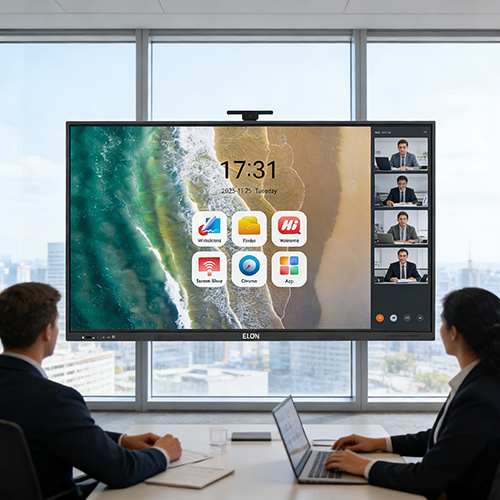
Learn what makes a reliable smart board manufacturer, including production capacity, quality control, certifications, and OEM support.
What Makes a Reliable Smart Board Manufacturer?
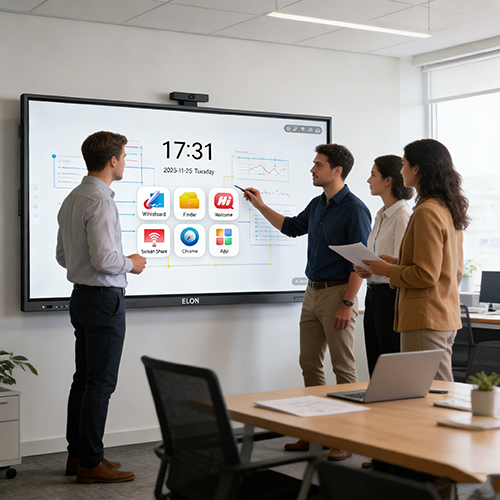
Discover how smart boards improve corporate training and presentations through collaboration, touch interaction, and wireless communication.
How Smart Boards Enhance Training and Corporate Presentations

